DeliveryAI specialist
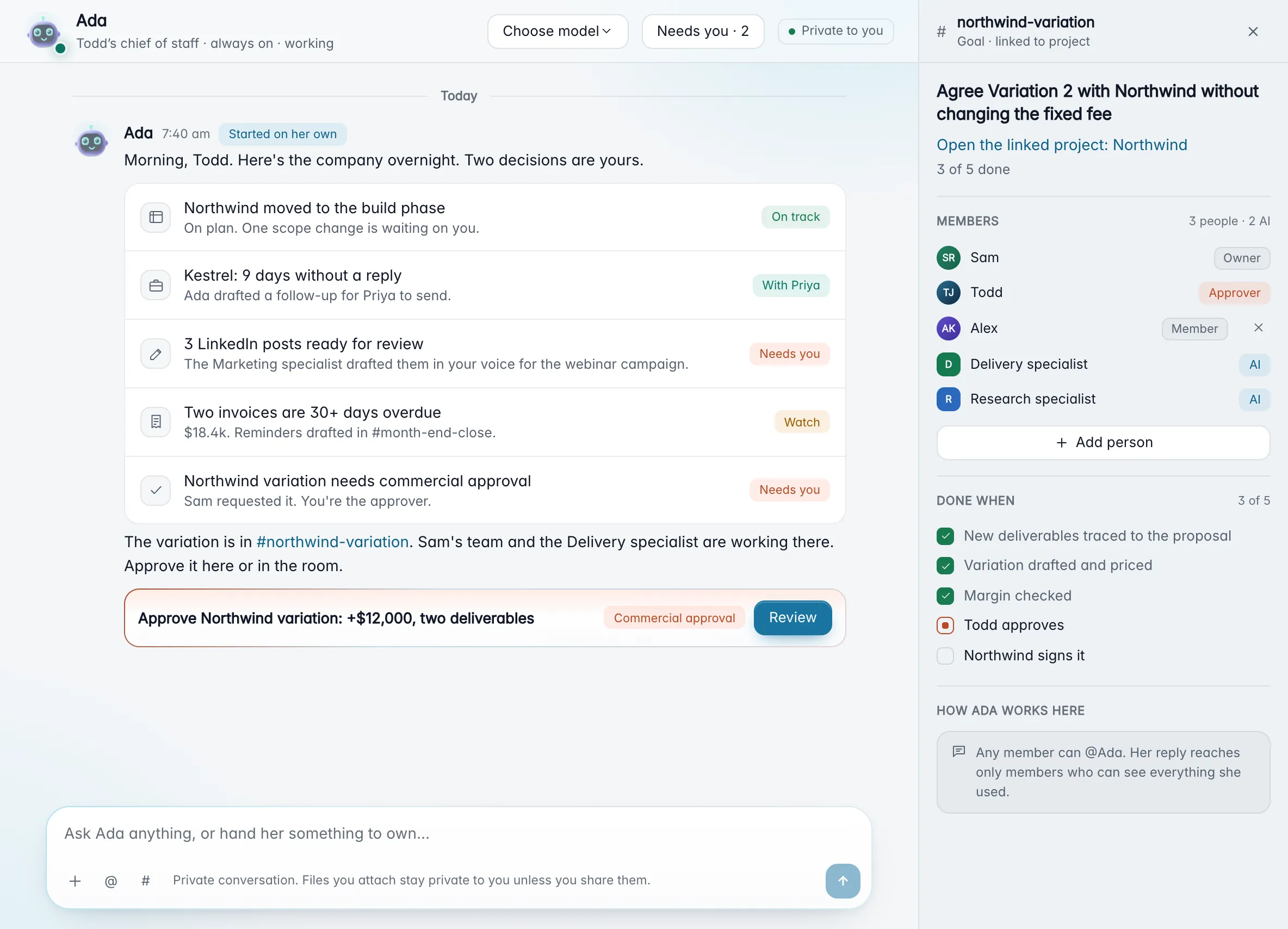
Variation 2 is drafted from the proposal and call notes. Training pack v2 is blocked until it’s approved.
In development
In shared goal rooms, Ada sends each answer only to members allowed to see everything she used.
Try Ada#northwind-variation
Goal room · Agree Variation 2 without changing the fixed feeGoal room
DeliveryAI specialist
Variation 2 is drafted from the proposal and call notes. Training pack v2 is blocked until it’s approved.
Sam (you)Sam
@Ada does the variation change our go-live date?
Adaanswering youanswering Samonly you and Todd see thisonly you and Sam see this
This goal room isn’t available to you
You don’t have access to this, so Ada can’t show it to you either. Ask an owner if you need access.
Sam asks @Ada. Sam and Todd get the answer. Alex is in the room but can’t open the earlier messages Ada used, so Alex gets nothing. Priya isn’t a member.
Priya isn’t a member of #northwind-variation, so the room doesn’t open for her and Ada’s answer to Sam never reaches her.
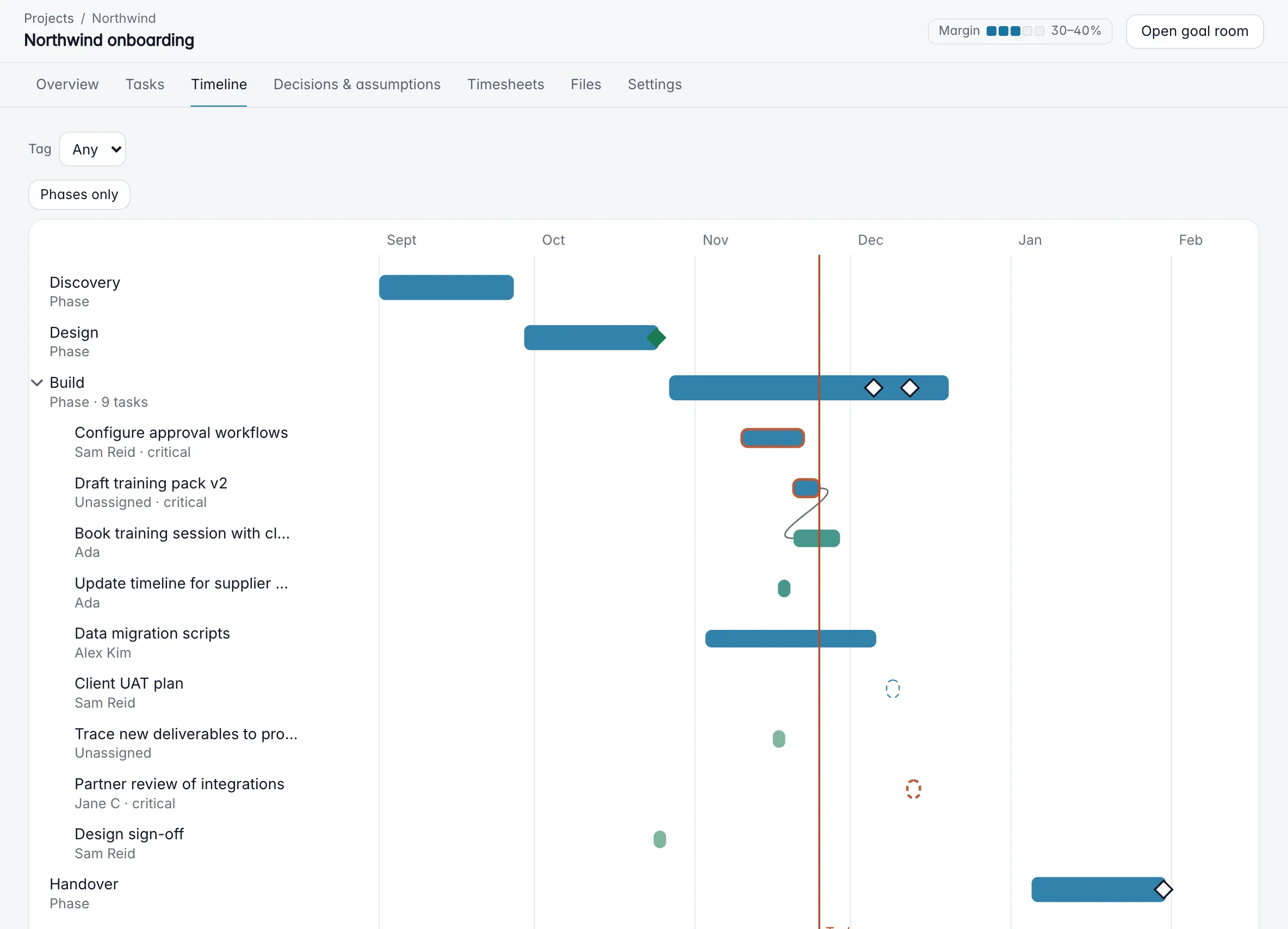
What each person sees of a project’s margin depends on their role. Delivery leads see bands only on their own projects.
Business owner
38%margin
Sees the exact margin.
Delivery lead
30 to 40%margin
Sees a margin band, such as 30 to 40%, on their own projects only.
Sales and marketing lead
Hidden
Sees no finance figures.
Project
Northwind onboarding
38% margin
30 to 40%
Hidden for your role
Sees the exact margin.
Sees a margin band, such as 30 to 40%, on their own projects only.
Sees no finance figures.
Finance is limited to owners and the finance team
You see margin bands on your own projects in Projects. Ada works with your access, so she can’t show finance figures beyond that.
Finance is limited to owners and the finance team
You don’t have finance access, so Ada can’t show these figures either. Ask an owner or the finance team if you need access.
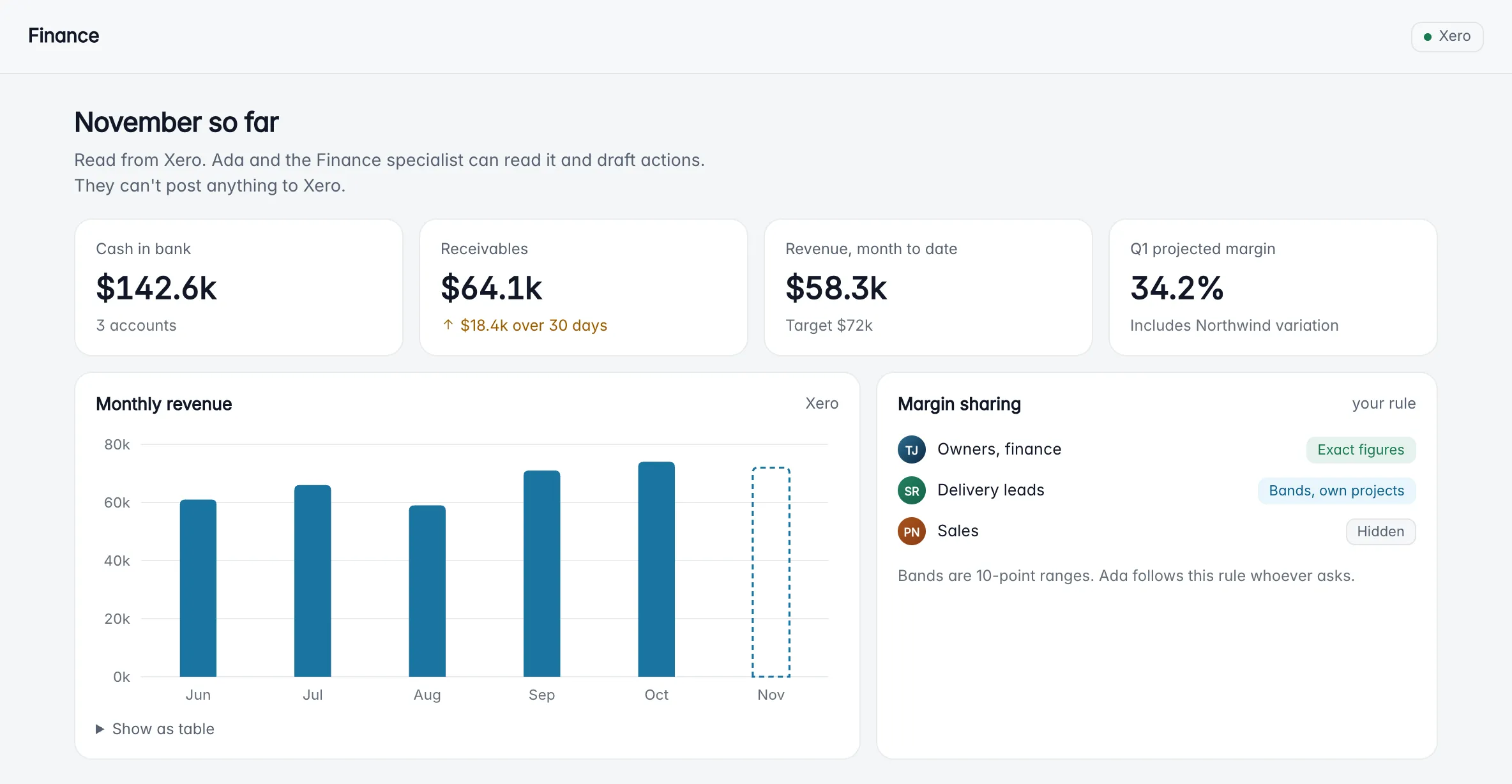
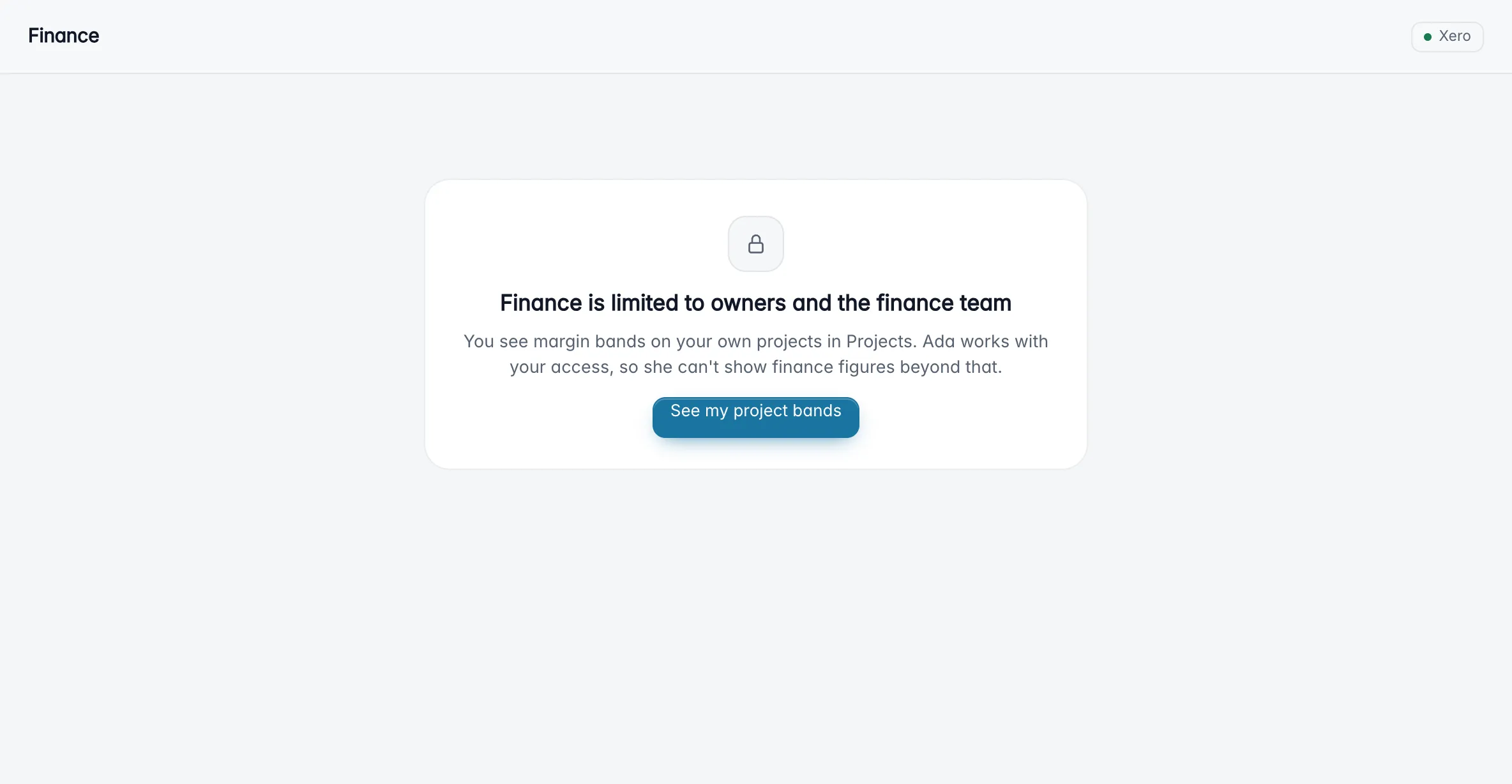
Pick a person, then a question. Ada answers with that person’s access. The people and figures are illustrative, and the demo changes nothing.
Your chat with Ada
Only you see your direct chats with Ada.
What’s the margin on Northwind onboarding?
Northwind onboarding’s margin is 38%.
Choose a question
Illustrative people and figures. This demo runs in your browser and changes nothing.
What’s the margin on Northwind onboarding?
Northwind onboarding’s margin is 38%.
Northwind onboarding is in the 30 to 40% band. You see margin bands on your own projects only.
I can’t show you finance figures because you don’t have finance access. Ask an owner or the finance team.
What needs my attention today?
Here’s what needs your attention today:
Here’s what needs your attention today:
Here’s what needs your attention today:
Draft a follow-up for Harbour renewal.
Here’s your follow-up draft. Once you approve it, it’s ready for you to send.
Follow-up draft
Hi Jordan, I’m checking in on Harbour’s renewal. Let me know a time that suits you to talk.
Here’s your follow-up draft. Once you approve it, it’s ready for you to send.
Follow-up draft
Hi Jordan, I’m checking in on Harbour’s renewal. Let me know a time that suits you to talk.
Here’s your follow-up draft. Once you approve it, it’s ready for you to send.
Follow-up draft
Hi Jordan, I’m checking in on Harbour’s renewal. Let me know a time that suits you to talk.
Check Training pack v2 against Variation 2.
I’m running a read-only check with your access. You’re the named approver for this task, so I post my result only after you approve it.
Check Training pack v2 against Variation 2
To doDoingDone
Ada is working
waiting for your decision
I’m running a read-only check with your access. Todd is the named approver for this task, so I post my result only after he approves it.
Check Training pack v2 against Variation 2
To doDoingDone
Ada is working
The check result is ready and waiting for Todd’s approval.
I’m running a read-only check with your access. Todd is the named approver for this task, so I post my result only after he approves it.
Check Training pack v2 against Variation 2
To doDoingDone
Ada is working
The check result is ready and waiting for Todd’s approval.
A goal room is where your team and Ada work towards one goal.
When a reply reaches only some members, it carries a label naming who sees it, such as “only you and Todd see this”. Members who can’t open what Ada used get no reply and no placeholder.
Sam and Todd get the answer. Alex gets nothing.
Any member can type @Ada. The question runs with that person’s access, and Ada answers from what’s in the room.
Ada doesn’t post records from outside the room, such as finance, deals, contracts or your mail. She points you to your own chat with her, where she answers within your access.
Only members can open a goal room. Only owners can add or remove people, and Ada OS asks the owner to confirm before sharing a room.
Ada OS checks these on the server for every request.
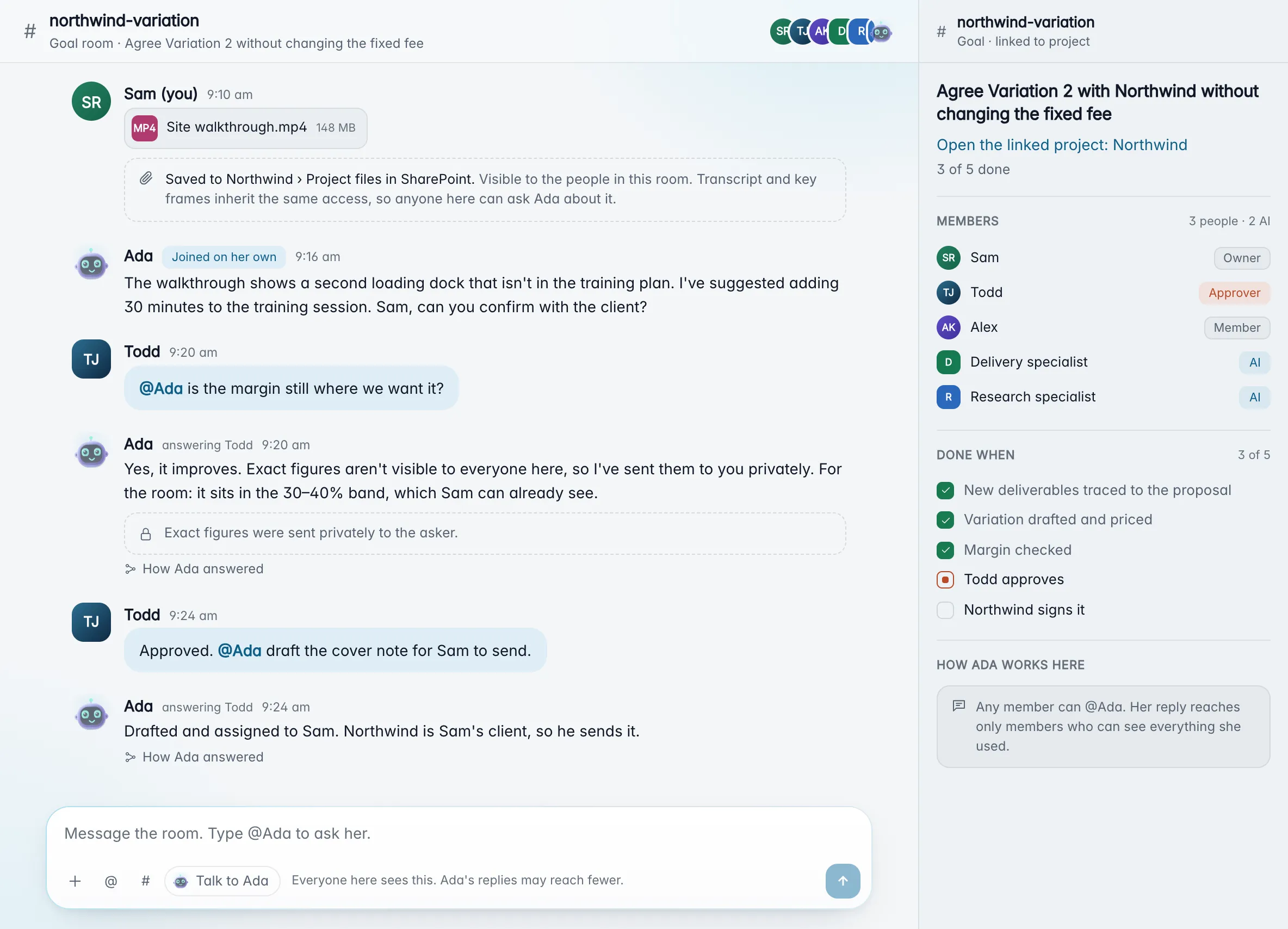
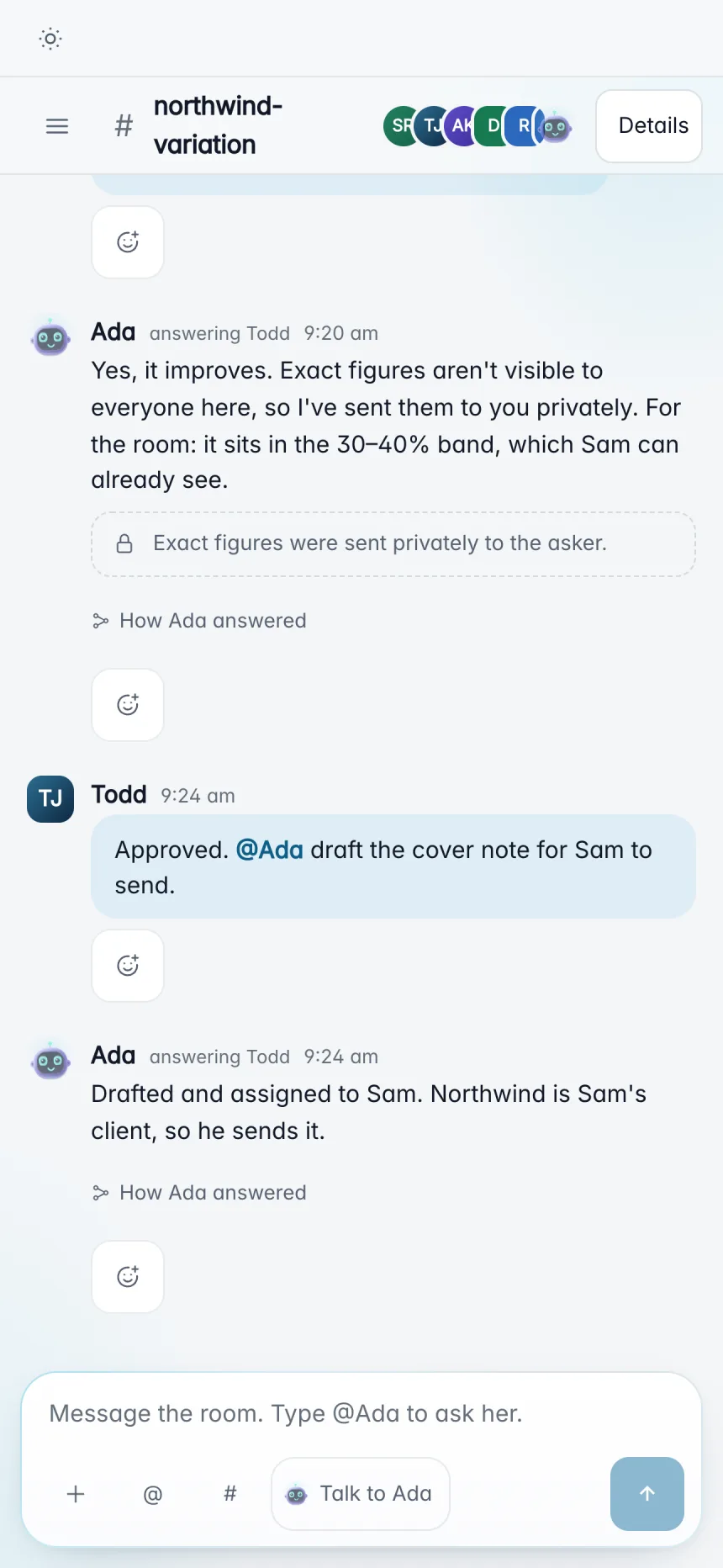
The brain links your documents, processes, skills, decisions and company knowledge. Ada also reads the pipeline, project and finance records the person asking is allowed to see.
When a machine proposes a link, it’s labelled inferred. Facts still come only from the linked file.
The brain sits in a private repository on a machine your company owns. Encrypted backups go to your company’s own network storage.
Chat runs on your company’s Claude or ChatGPT subscription. Chat text, and any company material Ada uses in the conversation, goes to the provider that handles it.
Your CRM records stay in your CRM. The company brain keeps a read-only copy.
Ada OS works across sales, outreach, proposals, content, delivery, the inbox and leadership reporting.
Ada finds deals that have stalled and drafts a follow-up for each. Any write to your CRM goes through its API with approval.
Ada finds prospects, researches them and drafts messages for the cold-outreach pipeline. A prospect is added to your CRM, with approval, once they reply or qualify.
Ada shows each project’s health from its tasks and milestones. Paid status comes from Xero.
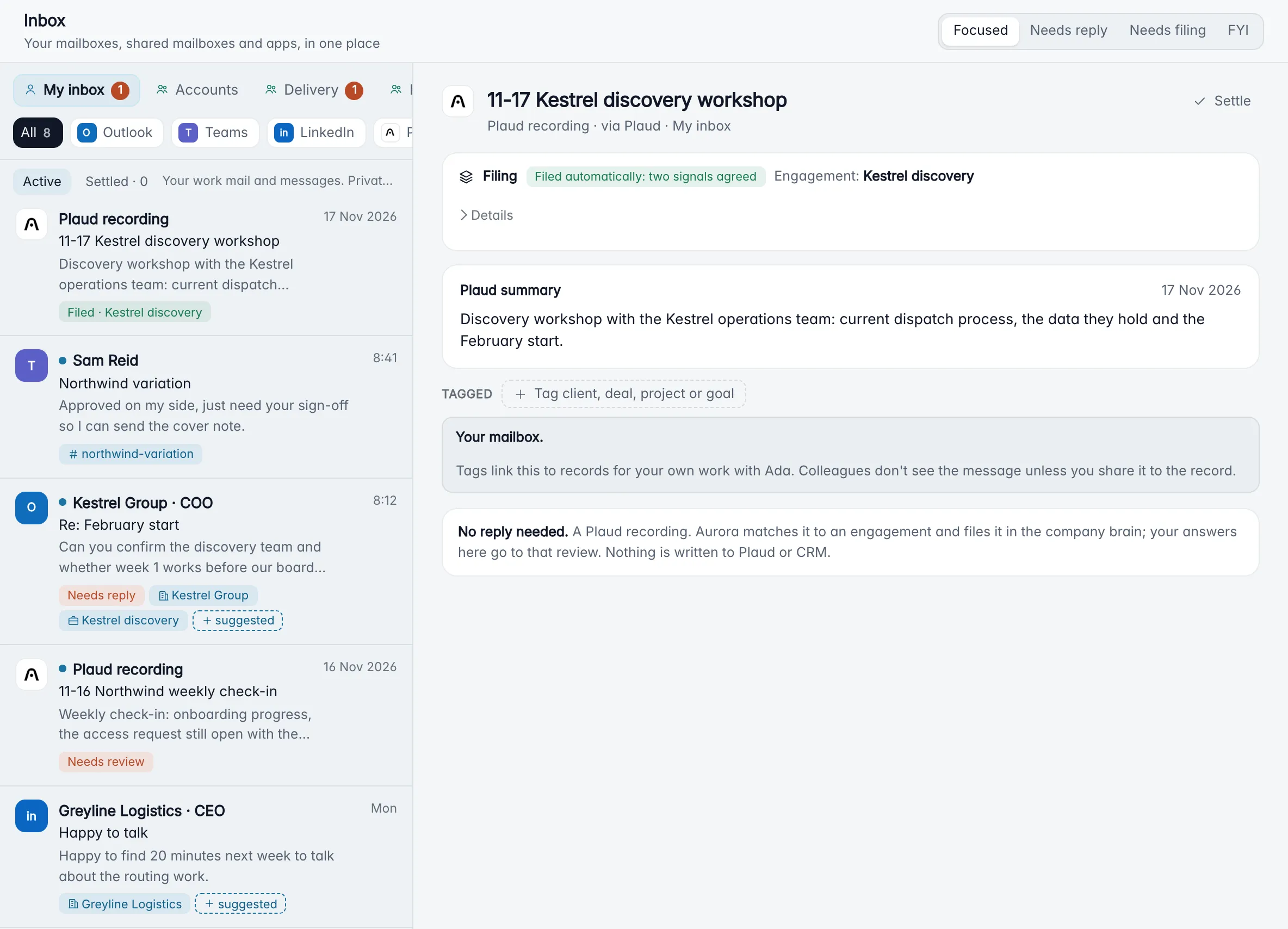
Ada OS has one inbox for your mailboxes, shared mailboxes and apps. Every morning, Ada tells each person what needs them.
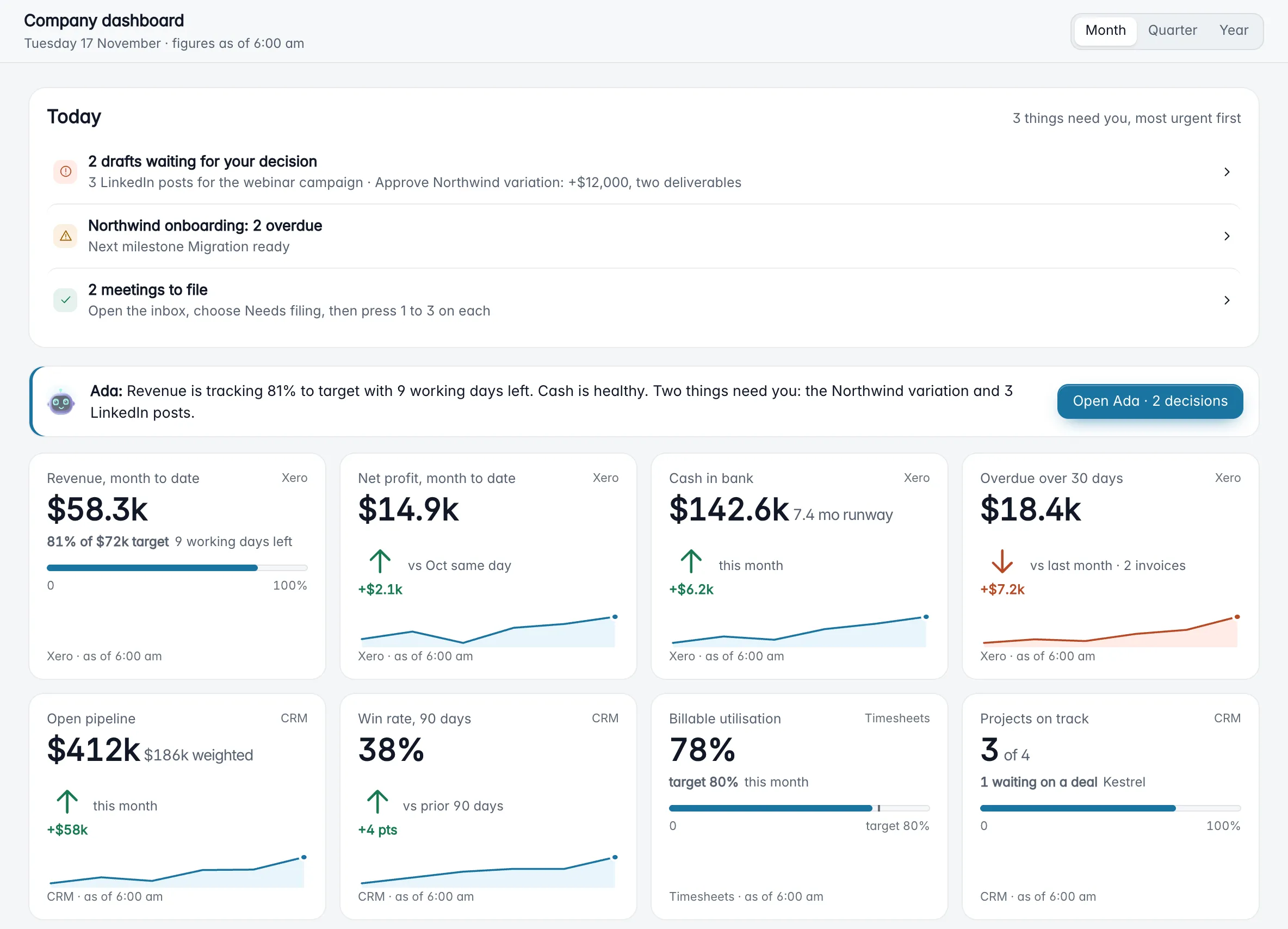
Ada puts revenue, cash and pipeline on one page.
Clients choose the scope, review the exact PDF, type or draw a signature and confirm with a code sent by email. Nothing is sent without explicit approval.
Select a step to see details
The client chooses the scope; changing it resets the draft and confirmations.
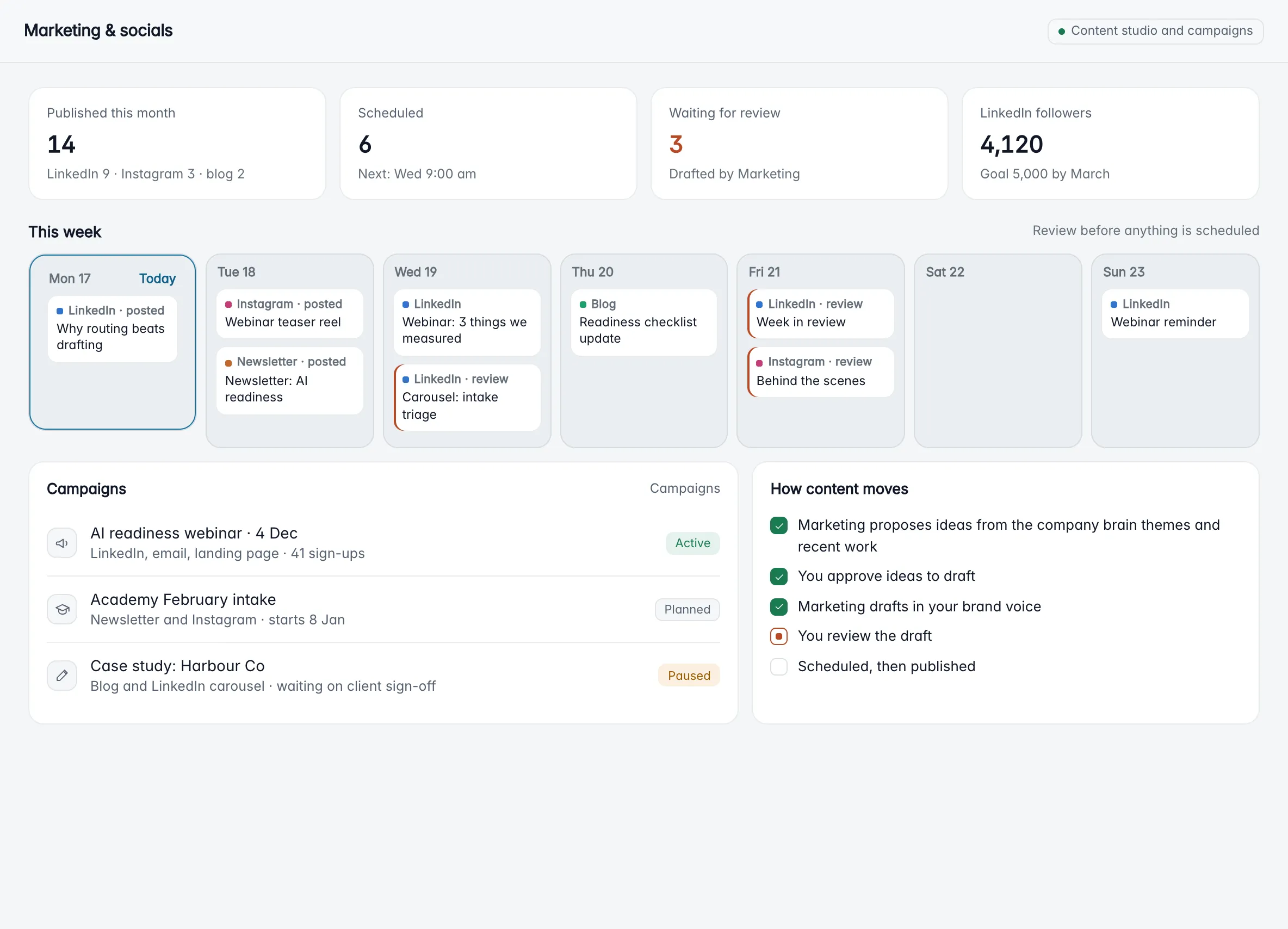
Ada drafts posts, newsletters and campaigns here, with generated images and video. Posts are reviewed before Metricool or Buffer sends them out. A separate Insights page reports marketing results, search visibility and AI visibility.
Records your decision. Nothing is published.
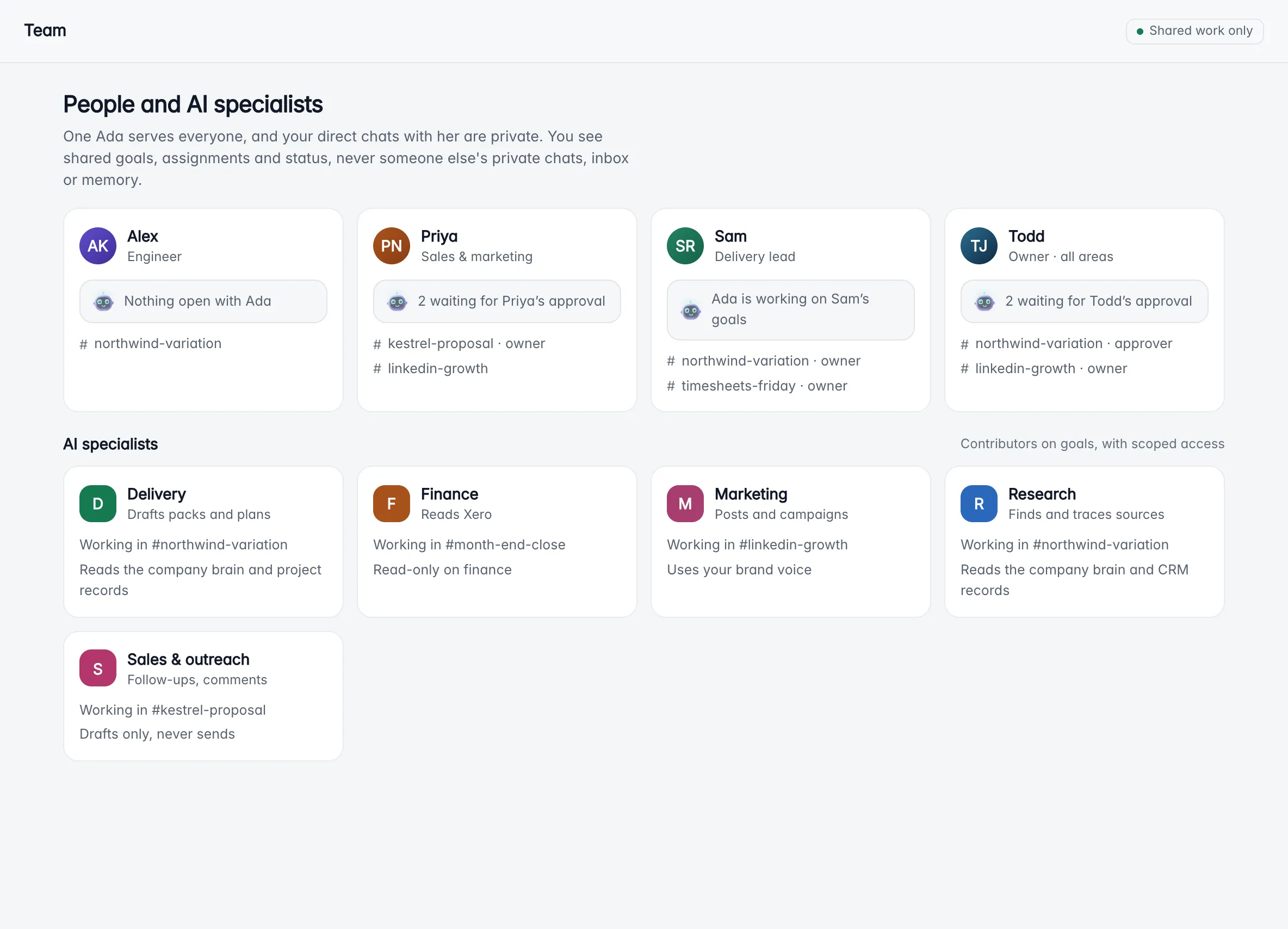
Ada works with specialists for delivery, sales, marketing, finance and research. Each reads with the access of the person who asked and changes nothing itself.
One company Ada for everyone who signs in.
Delivery
Drafts packs and plans
Sales & outreach
Follow-ups, comments
Marketing
Posts and campaigns
Finance
Reads Xero
Research
Finds and traces sources
Ada starts read-only work with your access and moves the task between To do and Doing. She never marks it Done, and her result is posted only once the named approver approves it.
Task result
Ada never sends, publishes, writes to your CRM or spends money until a person confirms on an action card. The approval covers that exact content, so a changed draft needs a new one.
Follow-up draft
Approved. Ready for you to send; nothing was sent.
Coming soon: agents your company can build on the same company brain, following the same access rules.
Owners can pick the model Ada uses in their own chat, and code sets the limits around it.
Ada’s chat runs as a tool-using agent through your company’s Claude or ChatGPT subscription.
Where the sizing policy names a stage, that stage uses the smallest, cheapest model that meets its measured quality bar. For a sized stage, a bigger model needs measured evidence.
Judgement calls belong to a dedicated decision engine, with fixed rules in code as a fallback. Code enforces authority, permissions and mandatory checks.
The hosted decision engine gets no client text. Code applies fixed rules to decisions involving client material.
The harness underneath
Deep Agents and LangGraph form Ada OS’s execution foundation, behind interfaces Ada OS controls and can replace. Every process follows the order below.
Knowledge graph
Start from what the company brain holds.
Context
Apply the asker’s access first, then gather what this request needs.
Procedure
Code enforces the required steps in order.
Decision points
Agents act only where the process allows them to decide.
Each run is traced under one run ID.
What each person can see depends on how they relate to teams, projects and records.
A built-in evaluator checks how people, teams, projects and records relate before anything is shown.
Every one of these is checked against the person’s access, along with runs and which model a request goes to.
Each background worker has its own identity, with limited access.
Keys are held in a vault and personal sign-ins in a separate keychain.
A goal room reply reaches only members who can open every source. Direct chats are private.
Ada uses a lesson in later work only once it’s approved.
Ada turns the correction into a lesson.
A lesson that quotes the person’s own correction word for word and doesn’t conflict with a recorded decision is approved automatically, with a record of the approval.
A person reviews every other lesson before Ada uses it.
Changes to skills and policies are never published automatically.
Ada reaches tools through an integration hub, and Ada OS stores and enforces the access and approval rules for every connection. The Connections page shows what Ada can reach and where each sign-in or key is kept.
agentgateway
Every connection Ada makes runs through this hub
 XeroAccounting
 Microsoft 365Calendar
 BufferSocial scheduling
 MetricoolSocial scheduling
 Meta AdsAds
 PostHogWebsite analytics
 ResendEmail delivery
 short.ioLink shortening
 PlaudMeeting recordings
 Kie.aiImage and video
 HiggsfieldImage and video
 ElevenLabsVoice
 Monid
Ada connects to these apps through the hub.
Connections to these apps are coming soon.
 Outlook mail
 Microsoft Teams
 SharePoint
 Gmail
 Google Calendar
 Google Drive
 Slack
 WhatsApp
 iMessage
 LinkedInLinkedIn Ads
 Google Ads
 Facebook Pages
 Instagram
 Google Business Profile
 Google Search Console
 Cloudflare
 HubSpot
 Salesforce
 Pipedrive
 Zoho CRM
 MYOB
 QuickBooks
 Stripe
 Shopify
 Zoom
 Dropbox
 Notion
 Canva
 Mailchimp
 Calendly
 Zendesk
 Intercom
These are built into Ada OS, so your team can do this work without a separate app.
Portfolio, board, Gantt, risks and issues, and roadmap.
Log time each week, then submit it for approval.
Clients choose the scope, review the exact PDF of the proposal, type or draw a signature, and confirm with a code sent by email.
Draft posts and campaigns. Posts are reviewed before the scheduling tool sends them.
Find prospects, research them and draft messages.
One inbox for your mailboxes, shared mailboxes and apps.
Answers about how Ada OS works, where your data sits and when you can get it.
Join the waitlistAda OS gives your whole team one AI chief of staff, Ada, working from your company’s shared knowledge. She serves everyone who signs in, and each request uses only the access of the person she’s helping.
A company brain is your company’s documents and the methods for using them. In Ada OS, Ada also reads the pipeline, project and finance records that the person asking is allowed to see.
Ada OS is for owners, CEOs and leadership teams of Australian businesses who want their whole team working with AI from shared company knowledge. It suits businesses where different people need different access, such as the business owner, a delivery lead and a sales and marketing lead.
Yes, two people can get different answers because Ada answers with the access of the person asking. For example, the business owner sees exact finance figures, the delivery lead sees margin bands only for their own projects, and the sales and marketing lead sees no finance figures.
A goal room in Ada OS is a shared space where your team and Ada work towards one goal. An @Ada question runs with the asker’s access, and her reply reaches only the members who can see everything she used to write it. When the delivery lead asks about the go-live date, the answer reaches them and the business owner, and a member who can’t see the messages Ada drew on doesn’t get it.
Ada OS checks access on the server for every request, using each person’s role, team and project membership. Someone who isn’t a goal room member can’t open that room.
Ada OS keeps your company brain in a private repository on a machine your company owns. Chat runs on your company’s Claude or ChatGPT subscription, and chat text goes to the provider that handles it. Backups are encrypted and kept on your company’s own network storage. Chat text includes your questions, Ada’s answers and any company material she uses to give them.
Your company brain is stored in Australia if the machine your company owns is here, and your encrypted backups are too if your network storage is here. Chat text goes to the Claude or ChatGPT provider that handles it, including any company material Ada uses to answer.
Ada OS uses Claude or ChatGPT for chat through your company’s subscription, and owners can choose the model for their own chat. Where the sizing policy names a stage, that stage uses the smallest, cheapest model that meets its measured quality bar. Client material is never sent to the hosted decision engine.
No, Ada can’t send, publish, write to the CRM or pay for anything until someone on your team confirms the exact content. Approval applies only to the content shown, so any change needs approval again.
Ada connects through an integration hub to Xero, the Microsoft 365 calendar, Buffer, Metricool, Meta Ads, PostHog, Resend, short.io, Plaud, Kie.ai, Higgsfield, ElevenLabs and Monid, and more apps are coming soon. Ada OS also has built-in modules for project delivery, timesheets, proposals, content, outreach and the inbox.
Compared with using ChatGPT or Claude directly, Ada OS gives your whole company one Ada that works from your company brain and the records each person is allowed to see. It adds morning briefs and shared goal rooms, with access checked on every request. Your company still chooses its Claude or ChatGPT subscription for chat.
You can’t build your own agents in Ada OS yet. If we add that, your agents would use the same company brain and follow the same access rules.
Ada OS keeps keys in a vault and personal sign-ins in a separate keychain, never inside the agent. Each background worker has its own identity with limited access, and permissions apply to search, tools, runs, outputs and which model a request goes to.
Yes. A correction becomes a lesson, and approved lessons are used in later work. A lesson that quotes the person’s own correction word for word, and doesn’t conflict with a recorded decision, is approved automatically, with a record of the approval. A person reviews every other lesson, and changes to skills and policies are never published automatically.
Ada works with five AI specialists: Delivery, Sales & outreach, Marketing, Finance and Research. Each specialist can read only what the person making the request can access, and changes nothing itself. A person can give Ada a project task: she starts read-only work with their access, moves it between To do and Doing, never marks it Done, and her result is posted only once the named approver approves it.
Ada’s chat and specialists run on your company’s Claude or ChatGPT subscription, and Ada OS’s code enforces access and approvals. Deep Agents and LangGraph form the execution foundation, behind interfaces Ada OS controls and can replace. Each process starts from the knowledge graph, retrieves information for the task within the asker’s access, follows steps enforced in code and calls agents only at set decision points. Each run is traced under one run ID.
Yes. Ada finds stalled deals and drafts follow-ups, and finds and researches prospects for cold outreach. Clients choose a proposal’s scope, review the exact PDF, sign and confirm with an emailed code, and nothing is sent without explicit approval. In Content Studio, Ada drafts posts, newsletters and campaigns, which are reviewed before they go out.
Ada OS is in development, with no launch date or published pricing. We’re building and using it at InnovateX first. Early access will go to a small number of businesses, and people on the waitlist will hear first.
InnovateX Solutions, a Brisbane company, makes Ada OS. To talk to us about it, email [email protected].
Early access goes to a small number of businesses. People on the waitlist hear first.
Tell us about your business and how you’d like your team to use Ada.